
- Step 1
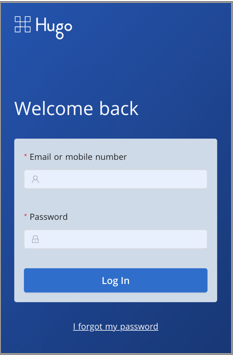
- Go to App.hugo.health and login using your Hugo Username and Password
- Use the "I forgot my password" link if you need to reset your password
- Step 2
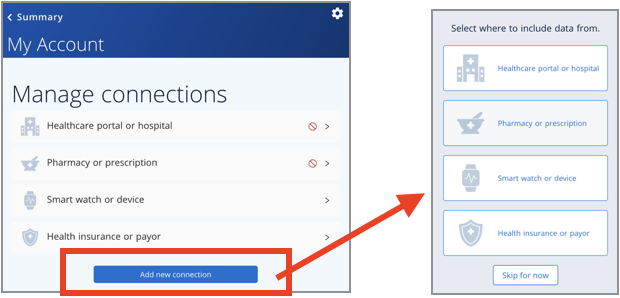
- Tap or click "Add new connection" and select the type of connection you want to add (Pharmacy or Prescription)
- Step 3
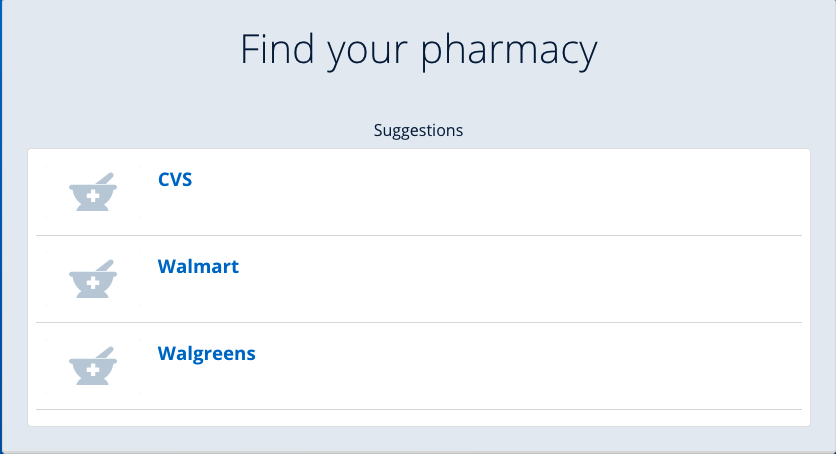
- Search for your Pharmacy or Prescription and select from the list that appears (CVS, Walmart, Walgreens, etc.).
- Step 4
- Enter your pharmacy username and password
- Note: If you are unsure of your pharmacy portal username or password, it is recommended that you visit your pharmacy portal website to confirm (or reset) your user name and password by clicking on "Go to this portal website" link.

If the following steps does not work, kindly email Support@hugo.health for assistance.
Comments
0 comments
Article is closed for comments.